
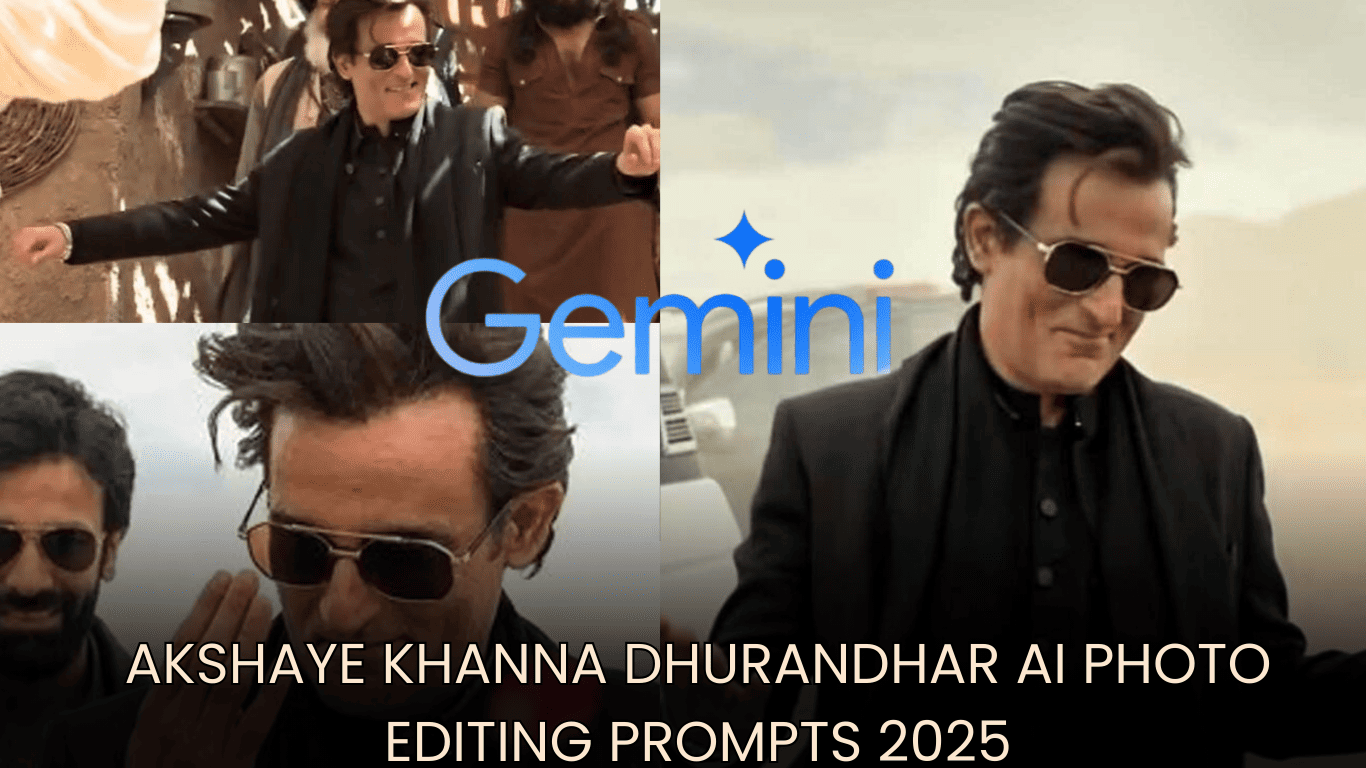
Akshaye Khanna Dhurandhar AI Photo Editing Prompts:धुरंधर फिल्म ने सोशल मीडिया पर जबरदस्त हलचल मचा दी है, खासकर अक्षय खन्ना का वह पावरफुल और आत्मविश्वास से भरा पोज़, जो इस समय इंस्टाग्राम पर ट्रेंड कर रहा है। उनका यह अंदाज़ लोगों को इतना पसंद आ रहा है कि हर कोई उसी लुक को अपनाना चाहता है।
अब फैन्स Google Gemini और अन्य AI फोटो एडिटिंग टूल्स की मदद से इस आइकॉनिक स्टाइल को दोबारा बना रहे हैं। AI टेक्नोलॉजी की सहायता से लोग अपने चेहरे और बॉडी लैंग्वेज को धुरंधर स्टाइल में ढाल रहे हैं, जिससे तस्वीरें पूरी तरह सिनेमाई और बेहद रियल लगती हैं।
Celebrity Selfie Ai Video Editing Prompt
इस गाइड में आपको धुरंधर AI फोटो एडिटिंग से जुड़े सबसे असरदार टिप्स और ट्रिक्स मिलेंगे, जिनकी मदद से आप अल्ट्रा-रियलिस्टिक, फिल्मी क्वालिटी वाली इमेज तैयार कर सकते हैं और अपनी अगली तस्वीर को सोशल मीडिया पर वायरल बनाने की दिशा में एक कदम आगे बढ़ सकते हैं।
Celebrate New Year 2026 with 23 Creative AI Prompts for MidJourney, Gemini, MyEdit & ChatGPT
What Is the Dhurandhar AI Photo Trend?
धुरंधर का ट्रेंड तब जोर पकड़ने लगा, जब अक्षय खन्ना की फिल्म से जुड़ी एक दमदार तस्वीर सोशल मीडिया पर तेजी से वायरल हुई। उस तस्वीर में उनका निडर अंदाज़, दोनों बाहें फैलाए हुए आत्मविश्वास से भरा हावभाव और उनका सिग्नेचर ब्लैक आउटफिट लोगों को तुरंत आकर्षित कर गया। देखते ही देखते यह लुक लोगों का फेवरेट बन गया।
इसके बाद AI टेक्नोलॉजी के शौकीनों ने इस ट्रेंड को और आगे बढ़ा दिया। अब लोग Google Gemini के प्रॉम्प्ट्स की मदद से अपने चेहरे पर वही धुरंधर वाला लुक तैयार कर रहे हैं। इसका नतीजा यह है कि सिनेमाई फील वाली, बिल्कुल फिल्म पोस्टर जैसी शानदार तस्वीरें सामने आ रही हैं।
ये AI से बनी इमेजेस इंस्टाग्राम और यूट्यूब शॉर्ट्स पर जमकर वायरल हो रही हैं और हजारों लाइक्स व व्यूज़ हासिल कर रही हैं। हर कोई इस ट्रेंड में अपनी अलग पहचान बनाने की कोशिश कर रहा है, जिससे धुरंधर स्टाइल और भी ज्यादा लोकप्रिय होता जा रहा है।
Best Akshaye Khanna Dhurandhar AI Photo Editing Prompts
नीचे कुछ बेहतरीन AI प्रॉम्प्ट्स दिए गए हैं, जिन्हें आप सीधे कॉपी करके Google Gemini या किसी भी एडवांस्ड AI फोटो एडिटिंग टूल में इस्तेमाल कर सकते हैं। इन प्रॉम्प्ट्स की मदद से आप आसानी से ट्रेंडिंग और सिनेमैटिक तस्वीरें तैयार कर पाएंगे।
Google Gemini Bullet Bike Ai Photo Editing Prompts
1. Rehman Dakait AI Prompt
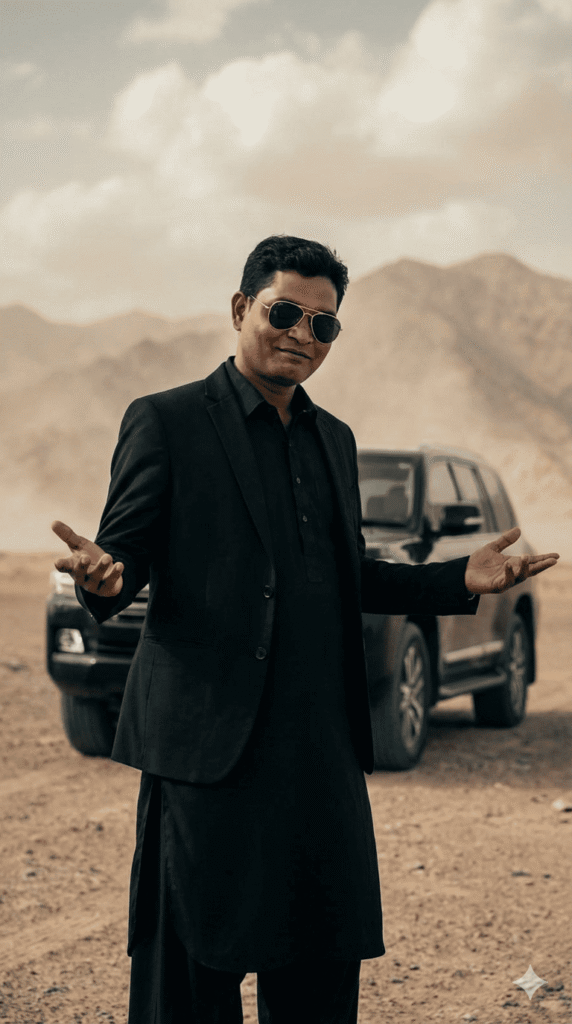
A charismatic, young man with dark,slicked-black hair and gold-rimmed aviator sunglasses. He is wearing a stylish black suit jacket over a black traditional tunic (shalwar kameez). He has a slightly smirking or confident expression and is gesturing outwards with both open palms in a ‘what can you do? pose. He is standing in a dusty, desolate desert or mountainous terrain. luxury SUV is parked behind him. The background is dusty with soft cloudy skies and muted beige tones. Cinematic lighting shallow depth of field realistic photography, 4K ultra-detailed moody Bollywood movie scene dramatic atmosphere professional color grading. Preserve Face 100% I want 100% same face as in the reference image no alteration.”
Google Gemini 2026 New Year Photo Prompts | Just 1 Click
2. Dhurandhar BTS Group Photo
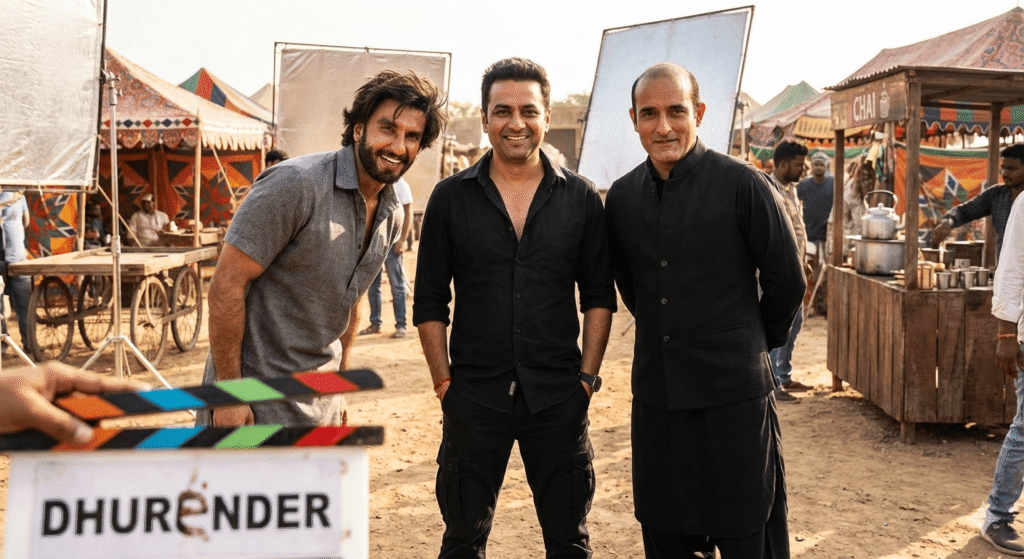
3. Ranveer Singh & Akshaye Khanna BTS Portrait
A natural daytime cinematic photo showing the user between Bollywood Actor Ranveer Singh and Akshaye Khanna. on the shooting stage of the film “Dhurender”.
Include realistic movie-set details — tents, chai stalls, dusty flooring, and reflector boards.
Akshaye in black kurta; Ranveer in gray traditional attire with expressive smile.
4. Vibrant Cultural Desert Dance Portrait
A full-body dancing shot in a bright desert (Rath ki Midan).
The user wears a black kurta, short black coat, and muffler with sunglasses.
Surround with joyful Balochi dancers and two distant Afghani bodyguards.
Hyper-realistic 8K detail, warm color tones, cultural vibrance.
5. Candid Desert BTS Selfie
A 4K smartphone-style selfie featuring the user with Bollywood actor Akshaye Khanna on a movie set. Khanna wears a black blazer and scarf, gold-rimmed sunglasses, and windswept hair. Add film crew, desert lighting, and technical gear in the background for realism.
6. Heroic Cinematic Entry Shot
The user walks forward confidently in a long black coat over a traditional outfit.
Dusty background, golden lighting, and motion blur create a dramatic hero-entry effect.
Ultra-realistic 8K cinematic color grading.
7. Cinematic Heroic Village Entry
A bold entry scene set in a rugged old village.
The user smiles confidently with arms stretched wide and sunglasses on.
Harsh sunlight filters through wooden beams, adding depth and cinematic shadows.
Dhurandhar Gemini AI Photo Editing Prompts for Girls (2025)
धुरंधर AI फोटो ट्रेंड सिर्फ लड़कों तक ही सीमित नहीं है, बल्कि यह उन लड़कियों के बीच भी तेजी से लोकप्रिय हो रहा है जो पावरफुल, सिनेमैटिक और बॉलीवुड-इंस्पायर्ड लुक पाना चाहती हैं। इस ट्रेंड में आत्मविश्वास, स्टाइल और दमदार प्रेज़ेंस को खास तौर पर दिखाया जाता है।
इसी को ध्यान में रखते हुए, नीचे लड़कियों के लिए खास तौर पर तैयार किए गए धुरंधर Gemini AI प्रॉम्प्ट्स दिए गए हैं। इन प्रॉम्प्ट्स को आप सीधे Google Gemini में इस्तेमाल करके हाई-क्वालिटी, फिल्मी अंदाज़ वाली AI तस्वीरें बना सकती हैं, जो सोशल मीडिया पर आसानी से वायरल होने की क्षमता रखती हैं।
1. Dhurandhar Signature Pose – Girl Version
Generate an image using the uploaded reference photo.
A confident woman with a medium skin tone stands in a dusty desert landscape. She is wearing black sunglasses, an all-black kurta, and has a slight confident smile on her face. Her hand pose matches the iconic “what happened?” gesture inspired by Akshaye Khanna’s Dhurandhar movie pose.
A luxury SUV is parked behind her. The background features dusty terrain, soft cloudy skies, and muted beige tones.
Cinematic lighting, shallow depth of field, realistic photography, 4K ultra-detailed, moody Bollywood movie scene, dramatic atmosphere, professional color grading.
Face must remain 100% identical to the reference image with no changes.
2. Candid Desert BTS Selfie (Girl & Akshaye Khanna)
A realistic, candid selfie shot taken in a desert movie-set environment.
Akshaye Khanna stands on the left, wearing a black blazer over a black kurta, a black scarf, and gold-rimmed aviator sunglasses. His hair appears slightly messy due to desert wind, giving a dramatic look.
On the right, a young woman smiles naturally at the camera. She is wearing a casual grey t-shirt, light makeup, and stylish glasses. Her hair is softly windswept.
The background includes film crew members, lighting equipment, technical rigs, and black SUVs parked at a distance.
Bright natural daylight, harsh shadows, 4K resolution, realistic smartphone photography style.
3. Dhurandhar BTS Group Photo (Female Center)
Hyper-realistic 8K behind-the-scenes photo from the movie “Dhurandhar.”
Outdoor daylight setting with natural cinematic lighting, shallow depth of field, and realistic shadows.
Three people stand together naturally.
Center (Me): Face exactly the same as the reference image. Outfit includes a black denim jacket, black t-shirt, black baggy jeans, and chunky white sneakers. Slight smile, relaxed pose.
Left Actor: Black kurta, black pajama, black stole/scarf, black outer layer, rectangular black sunglasses.
Right Actor: Brown traditional kurta, brown salwar, brown boots, black aviator sunglasses.
All faces, outfits, hairstyles, and sunglasses must match the reference images exactly.
4. Cinematic Portrait – Stylish Dhurandhar Look (Girl)
Create a cinematic portrait in the same style as the reference image.
Replace the face using the uploaded image — keep it 101% identical with no smoothing, reshaping, or alterations.
The woman wears stylish sunglasses and a sleek black outfit. Her hair is slightly windswept.
She makes a charismatic hand gesture near her face.
Add a softly blurred red petal floating in the foreground for cinematic depth.
Natural outdoor lighting, soft background blur, high-end cinematic color grading.
Overall mood: classy, powerful, bold, and cinematic.
5. Heroic Cinematic Entry – Woman Version
Generate an image using the uploaded reference photo.
A confident woman walks forward in a dramatic cinematic scene. She wears an elegant all-black kurta set with a long flowing black coat.
She has sharp facial features, a powerful expression, dark sunglasses, and subtly windswept hair.
Two people walk behind her — one elderly man with a long white beard, turban, traditional jewelry, and grey ethnic clothing, and another person dressed in black with sunglasses.
The scene is set in an ancient Indian/Middle Eastern marketplace with sandstone architecture.
Warm golden lighting, deep shadows, ultra-realistic 8K quality, cinematic hero-entry shot, crisp focus.
6. G-Wagon Desert Power Portrait (Girl)
A realistic cinematic portrait of a young woman standing in front of a black Mercedes G-Wagon in a desert environment.
She has long, slightly messy dark hair parted in the middle and a calm yet serious expression.
Outfit: black fuzzy jacket over a black top with light blue jeans.
She holds a handgun in both hands in a relaxed, natural grip.
Soft sandy dunes in the background with a muted sky.
Natural daylight with warm cinematic tones, bold and gritty mood, high detail, crisp focus.
7. DSLR-Style Vertical Shot (9:16 Ratio)
Generate a 9:16 vertical DSLR-style image using the attached reference photo.
Keep the face, features, expression, hairstyle, and body structure 100% identical to the reference image.
The woman wears a black top, black jacket, and blue jeans, standing in a natural pose while holding a handgun exactly like the reference photo.
Slight close-up framing, cinematic depth, realistic lighting, ultra-sharp focus.
How to Create Dhurandhar Movie Scene Photos
ट्रेंडिंग एआई फोटो बनाना अब पहले से कहीं ज्यादा आसान है। इन सरल चरणों का पालन करें:
- ऊपर दी गई सूची से किसी भी एआई प्रॉम्प्ट को कॉपी करें ।
- गूगल जेमिनी पर जाएं और अपने खाते में लॉग इन करें।
- इमेज आइकन का उपयोग करके अपनी मनचाही फोटो अपलोड करें ।
- चयनित प्रॉम्प्ट को टेक्स्ट बॉक्स में पेस्ट करें ।
- “क्रिएट इमेज नैनो बनाना” फीचर को सक्रिय करें ।
- प्रॉम्प्ट भेजें और प्रोसेसिंग के लिए कुछ सेकंड प्रतीक्षा करें।
- एआई द्वारा तैयार की गई अंतिम तस्वीर को डाउनलोड करें और उसे सेव करें।
Dhurandhar Images to Video Prompt for Veo 3.1
{
  "reference_frame": {
    "source": "use_exact_uploaded_image",
    "lock_identity": true,
    "lock_pose": true,
    "lock_outfit": true,
    "lock_background": true
  },

  "motion": {
    "type": "ultra_subtle_human_motion",
    "dance_style": "soft_arabic_rhythm",
    "intensity": 0.15,
    "details": {
      "hands": {
        "movement": "gentle_rhythmic_hand_waves",
        "speed": "slow",
        "range": "very_small",
        "constraints": "no_blur_no_deformation"
      },
      "shoulders": {
        "movement": "micro_shoulder_bounce",
        "sync": "arabic_beat",
        "intensity": "minimal"
      },
      "head": {
        "movement": "natural_micro_nods",
        "range": "extremely_small",
        "constraints": "no_rotation_no_tilt"
      },
      "body": {
        "movement": "light_side_to_side_sway",
        "balance": "stable",
        "visibility": "barely_noticeable"
      }
    }
  },

  "facial_expression": {
    "expression_lock": true,
    "smile": "unchanged",
    "emotion": "constant",
    "blink_control": "natural_minimal",
    "no_lip_movement": true
  },

  "environment": {
    "background": "desert_scene",
    "background_lock": true,
    "car": {
      "presence": "same_car_same_position",
      "movement": "none"
    },
    "lighting": {
      "type": "original_lighting",
      "lock": true
    }
  },

  "camera": {
    "movement": {
      "type": "micro_handheld_shake",
      "intensity": 0.1
    },
    "zoom": {
      "type": "soft_breathing_zoom",
      "range": "very_light",
      "smoothness": "high"
    },
    "angle_change": false,
    "rotation": false
  },

  "audio_vibe": {
    "music_style": "upbeat_arabic_desert_festival",
    "sync_motion_to_music": true
  },

  "visual_style": {
    "realism": "ultra_realistic",
    "color_grading": "same_as_reference",
    "contrast": "unchanged",
    "sharpness": "high",
    "artifacts": "none"
  },

  "negative_prompt": [
    "face_change",
    "identity_shift",
    "extra_limbs",
    "hand_distortion",
    "body_warping",
    "background_change",
    "lighting_change",
    "camera_angle_change",
    "fast_dance_moves",
    "blur",
    "flicker",
    "cartoon_style",
    "plastic_skin"
  ],

  "output": {
    "video_quality": "cinematic",
    "motion_feel": "smooth_premium",
    "duration": "short_loop_friendly"
  }
}
Why Is the Dhurandhar Photo Trend Going Viral?
धुरंधर फोटो ट्रेंड बॉलीवुड की चमक और आधुनिक AI तकनीक का एक शानदार संगम बन चुका है। लोग इन सिनेमैटिक और पावरफुल विज़ुअल्स को खूब पसंद कर रहे हैं, और अब AI टूल्स की मदद से कोई भी व्यक्ति इन्हें बेहद आसानी से दोबारा तैयार कर सकता है।
अक्षय खन्ना के प्रभावशाली पोज़ और Google Gemini द्वारा किया गया रियलिस्टिक इमेज जनरेशन इन तस्वीरों को सोशल मीडिया पर खास पहचान दिला रहा है। यही वजह है कि ये AI फोटो इंस्टाग्राम, फेसबुक और यूट्यूब शॉर्ट्स पर तेजी से वायरल हो रही हैं।
चाहे आप एक इन्फ्लुएंसर हों या सिर्फ नए ट्रेंड्स को आज़माना चाहते हों, धुरंधर स्टाइल में की गई फोटो एडिटिंग आपके कंटेंट की एंगेजमेंट और रीच दोनों को तुरंत बढ़ा सकती है।
Conclusion
इस तरह आप भी अक्षय खन्ना के धुरंधर स्टाइल में अपनी खुद की AI तस्वीरें बिल्कुल प्रोफेशनल अंदाज़ में तैयार कर सकते हैं। सही Google Gemini AI प्रॉम्प्ट्स का इस्तेमाल करके आप कुछ ही मिनटों में फिल्म पोस्टर जैसी हाई-क्वालिटी इमेज डिजाइन कर पाएंगे।
आज ही इन प्रॉम्प्ट्स को ट्राई करें, अलग-अलग लाइटिंग, एंगल और पोज़ के साथ एक्सपेरिमेंट करें और अपनी सबसे बेहतरीन तस्वीरों को सोशल मीडिया पर शेयर करें। यह ट्रेंड बहुत तेजी से लोकप्रिय हो रहा है—इसलिए देर न करें, अभी जुड़ें और 2025 में अपनी AI तस्वीरों को सबसे अलग पहचान दिलाएं।
Share to Help