
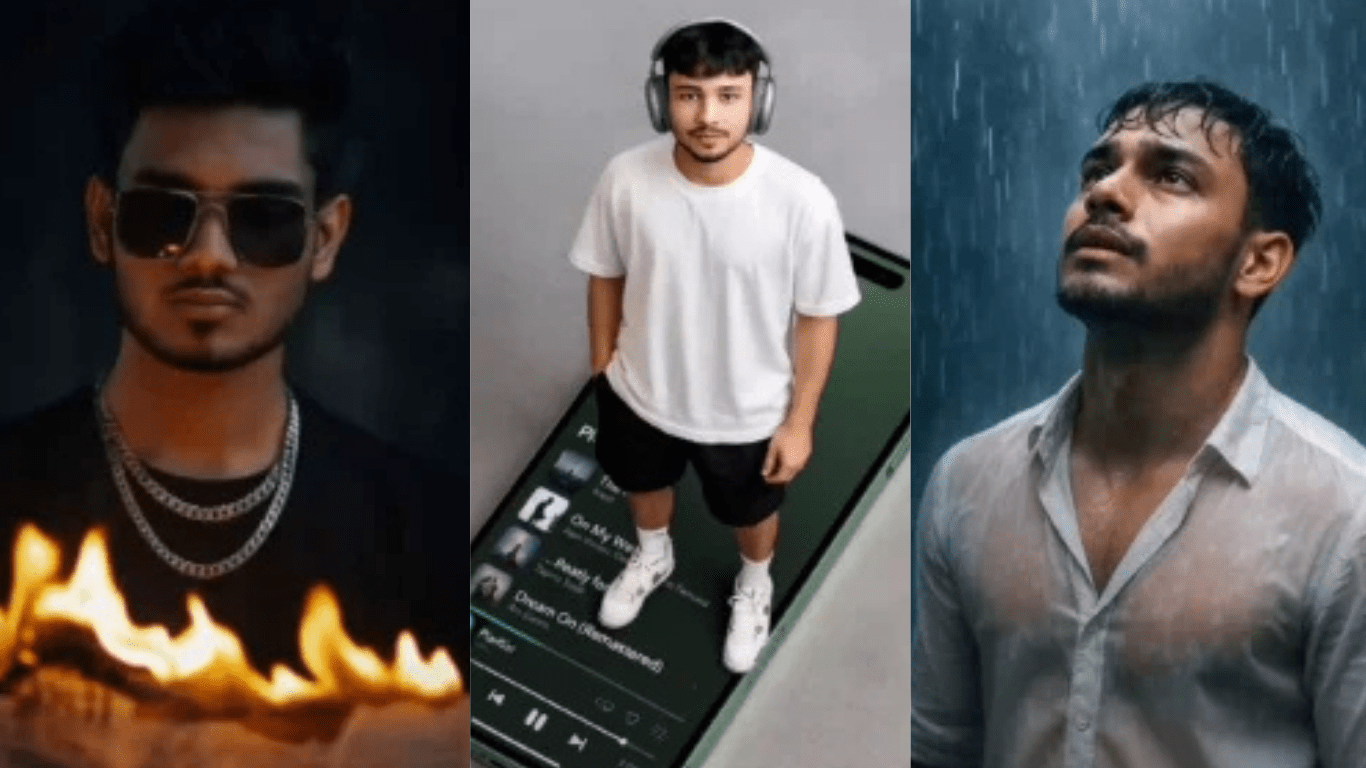
Chatgpt Cinematic Ai Photo Editing Prompts 2026:आज के समय में ChatGPT की मदद से सिनेमैटिक और वायरल फोटो बनाना पहले से कहीं ज्यादा आसान हो गया है। मैंने इससे पहले भी कई लेखों में अलग-अलग AI फोटो एडिटिंग स्टाइल्स और ट्रेंड्स के बारे में बताया था, जहां हर बार कुछ नया सीखने को मिला।
AI एडिटिंग की सबसे खास बात यही है कि इसमें हर दिन नए ट्रेंड आते रहते हैं। शुरुआत में हमने कुछ बेसिक और फन स्टाइल्स जैसे डोरेमोन-स्टाइल AI एडिट्स के बारे में बात की थी, लेकिन कई लोगों को उससे ज्यादा प्रोफेशनल और सिनेमैटिक लुक चाहिए था। दूसरी तरफ, वीडियो एडिटिंग टेम्पलेट्स को काफी अच्छा रिस्पॉन्स मिला, जिससे हमें समझ आया कि लोग अब वायरल और हाई-क्वालिटी AI कंटेंट बनाना चाहते हैं।
इसी वजह से अब हम आपके लिए एक नया और बिल्कुल ट्रेंडिंग कलेक्शन लेकर आए हैं—ऐसे सिनेमैटिक AI फोटो एडिटिंग स्टाइल्स जो इस समय सोशल मीडिया पर तेजी से वायरल हो रहे हैं। इन एडिट्स में आपको प्रोफेशनल लाइटिंग, मूवी-जैसा कलर ग्रेडिंग, DSLR ब्लर और बेहद रियलिस्टिक डिटेल्स देखने को मिलेंगी।
Chatgpt Boys Attitude AI Photo Editing Prompts – Cinematic & Luxury Look
इस लेख में हम आपको बताएंगे:
- ट्रेंडिंग सिनेमैटिक AI फोटो कैसे बनाएं
- कौन से प्रॉम्प्ट सबसे अच्छे रिजल्ट देते हैं
- किन स्टाइल्स पर अभी सबसे ज्यादा वायरल कंटेंट बन रहा है
- और आप अपनी फोटो को सिर्फ कुछ स्टेप्स में प्रोफेशनल लुक कैसे दे सकते हैं
अगर आप भी इंस्टाग्राम या सोशल मीडिया के लिए यूनिक और वायरल AI इमेज बनाना चाहते हैं, तो इस लेख को आखिर तक जरूर पढ़ें।
New Trending 5 Chatgpt Cinematic Ai Photo Editing
जब मैंने ChatGPT के जरिए अलग-अलग AI फोटो एडिटिंग स्टाइल्स शेयर किए, तो काफी लोगों ने कहा कि बेसिक एडिटिंग तो अच्छी है, लेकिन उन्हें खास तौर पर सिनेमैटिक एडिटिंग सीखनी है। लोगों की सबसे ज्यादा डिमांड ऐसी एडिटिंग की थी जो देखने में बिल्कुल फिल्मी, प्रोफेशनल और हाई-क्वालिटी लगे।
कई यूज़र्स ने बताया कि उन्हें वही स्टाइल पसंद आता है जिसमें मूवी-जैसी कलर ग्रेडिंग, सॉफ्ट लाइटिंग, DSLR ब्लर और रियलिस्टिक सिनेमैटिक फील हो। इसी वजह से हमने इस बार खास तौर पर ऐसे AI प्रॉम्प्ट्स और एडिटिंग स्टाइल्स तैयार किए हैं जो पूरी तरह सिनेमैटिक लुक पर फोकस करते हैं।
यहाँ जो भी एडिटिंग स्टाइल्स और प्रॉम्प्ट्स दिए गए हैं, वे सभी प्रोफेशनल सिनेमैटिक फील देने के लिए डिज़ाइन किए गए हैं। इनकी मदद से आप अपनी साधारण फोटो को भी ऐसा लुक दे सकते हैं, जैसे वह किसी फिल्म, म्यूजिक वीडियो या प्रोफेशनल फोटोशूट का हिस्सा हो।
अगर आप सोशल मीडिया पर अलग दिखने वाली, हाई-क्वालिटी और वायरल स्टाइल की तस्वीरें बनाना चाहते हैं, तो ये सिनेमैटिक AI एडिटिंग प्रॉम्प्ट्स आपके लिए काफी उपयोगी साबित हो सकते हैं।
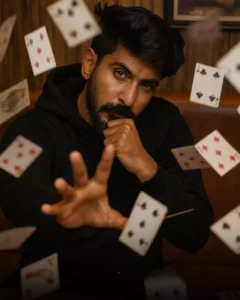
A young man with dark hair(maintain exact face and skin tone with sharp features) wearing a black hoodie sits in a rustic wooden booth, staring intensely at the camera with one hand supporting his chin and the other reaching forward as if performing telekinesis. Dozens of playing cards fly around him in mid-air, captured n dynamic slow-motion with motion blur. The background shows vertical wooden panels and a framed photo of a man playing cards.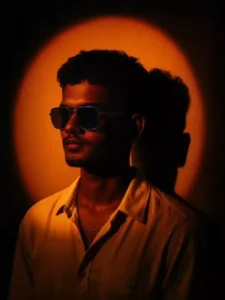
Create a cinematic studio portrait of the uploaded person, with a dramatic orange-yellow spotlight forming a glowing circular halo on the wall behind them. The lighting should cast deep shadows on the wall, especially the person's head shadow to the right side. The person should have short curly or textured hair, wearing a cream or off-white open-collar shirt and a thin chain necklace. The subject is facing slightly left with a soft, introspective expression. The background is minimalist and dark, allowing the warm lighting to dominate the scene. Capture a soft, moody, golden glow across the face and upper chest, blending realism with an artistic sunset tone."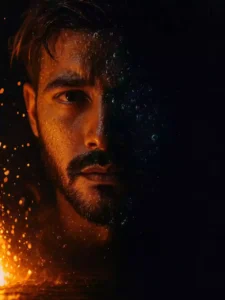
Create a high-contrast close-up portrait of the referenced man. The image should depict only the left half of his face, partially submerged in water, with fire and ice droplets and bubbles visible on skin and hair. Illuminate the left side of the face dramatically, casting the rest into deep shadow. dark background, detail into skin texture, PHOTO beard stubble, and eye focus to evoke a moody color. cinematic atmosphere. 3:4 orientation.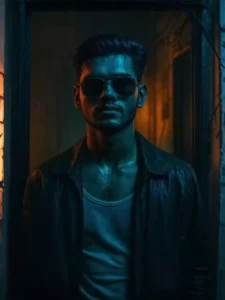
Convert this photo into a cinematic portrait of a young man standing in a doorway at night. Apply dramatic colored lighting: blue from the front and warm orange behind him in the room. The setting should look slightly gritty or vintage, like an old apartment with tile walls and visible wires. Add soft shadows, rain or misty atmosphere, and a film grain texture for a moody, neo-noir feel. Wet hair, white tank top, and an open dark jacket. Make the image highly detailed, realistic, and color-graded like a movie still."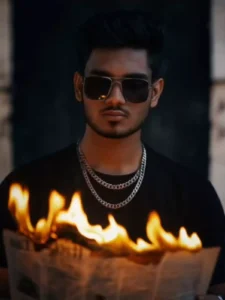
subject should wear a black shirt and layered silver chains for a bold, modern look. The expression should be serious and contemplative as the person looks down at the burning newspaper. The atmosphere should be intense and mysterious. Replace the face with the person from the uploaded photo, matching the lighting, skin tone, and perspective realistically. Keep the image high quality and photorealistic.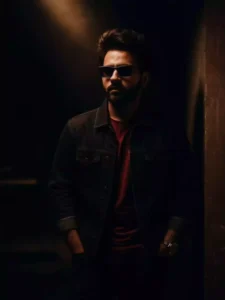
“Convert this image into a asthetic 0.6 lens portrait of a boy Standing leaning against a wall under a dramatic spotlight in a construction building. with the same face as uploaded image. The boy wears a black denim jaket, red tshirt with black jeans, and and wear a classy sunglass. His hands are in his jeans pokets, and the light is nightmare. creating a ai”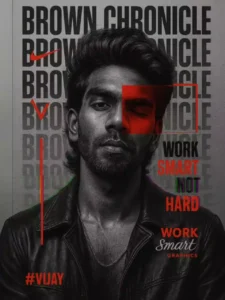
HYPER-DETAILED GRAPHIC DESIGN FEATURING A STRIKING PORTRAIT OF A YOUNG MAN WITH THE SAME FACE AS UPLOADED] WITH A CONFIDENT DEMEANOUR. HIS HEAD IS ADORNED WITH VOLUMINOUS, ADDING TEXTURE AND DEPTH TO THE COMPOSITION. THE PORTRAIT IS RENDERED IN A HIGH-CONTRAST BLACK-AND-WHITE STYLE, STANDING OUT AGAINST THE MINIMALIST BACKGROUND. HIS EXPRESSION IS CALM YET DETERMINED, WITH ONE EYE PARTIALLY OBSCURED BY A BOLD RED RECTANGULAR OVERLAY THAT ADDS A MODERN, ARTISTIC FLAIR.

THE BACKGROUND IS A SMOOTH, TEXTURED GREY CANVAS.

SERVING AS A NEUTRAL BACKDROP THAT ENHANCES THE FOCAL ELEMENTS. OVERLAID VERTICALLY ALONG THE LEFT SIDE OF THE IMAGE, THE WORD "PAUL SOMENDRA IS REPEATED IN LARGE, BOLD
BLACK LETTERS WITH A SLIGHT TRANSPARENCY EFFECT.

CREATING A LAYERED, DYNAMIC LOOK INTERSPERSED WITHIN THIS TEXT ARE ICONIC DESIGN ELEMENTS: A PROMINENT NIKE LOGO IN RED NEAR THE TOP. A STYLIZED RED "S" LOWER DOWN, AND A VERTICAL RED LINE THAT PUNCTUATES THE DESIGN. TO THE RIGHT. A RED GEOMETRIC FRAME SURROUNDS THE OBSCURED EYE, DRAWING ATTENTION TO THE INTERPLAY OF COLOUR AND FORM. AT THE BOTTOM RIGHT. THE PHRASE "WORK SMART NOT HARD" IS WRITTEN IN BOLD RED CAPITAL LETTERS, WITH "SMART" IN A SMALLER, ELEGANT CURSIVE SCRIPT BENEATH IT SIGNED OFF WITH "GRAPHICS" IN A MATCHING STYLE, SUGGESTING A PERSONAL OR BRAND SIGNATURE. THE BOTTOM LEFT CORNER FEATURES THE HASHTAG #PAUL" IN RED. REINFORCING THE IDENTITY THEME.
THE YOUNG MAN'S ATTIRE, A PARTIALLY VISIBLE BLACK LEATHER JACKET WITH AN OPEN COLLAR, ADDS A RUGGED YET STYLISH EDGE TO THE OVERALL AESTHETIC.

THE LIGHTING IS SOFT YET DRAMATIC. HIGHLIGHTING THE TEXTURES OF HIS HAIR AND JACKET, WHILE THE RED ACCENTS POP VIVIDLY AGAINST THE GRAYSCALE TONES, CREATING A COHESIVE, HIGH-ENERGY VISUAL THAT BLENDS STREETWEAR CULTURE WITH GRAPHIC ARTISTRY. PHOTOREALISTIC, SHALLOW DEPTH OF FIELD, HIGH-RESOLUTION DSLR QUALITY, HASSELBLAD X2D 100C, SHALLOW DEPTH OF FIELD. SHARPLY FOCUSED ON ME.4:5 ASPECT RATIO. MAKE IT 8K ULTRA REALISTIC HYPER DETAILED
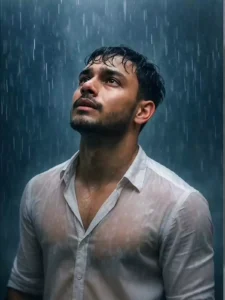
A stylish model standing in heavy rain, soaked and expressive, wearing a semi-wet white dress shirt with subtle transparency, artistically clinging to his form. He looks upward with a cinematic, emotional expression. Rain droplets suspended midair, dramatic lighting with cool blue tones, soft mist in the background, shallow depth of field. Editorial fashion shoot style, aesthetics, captured in ultra-high resolution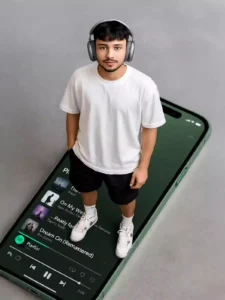
A stylish photo of me (uploaded photo as reference) as young mate model with messy comma hair stands on a giant iPhone 16 screen showing a Spotify playlist. He wears 2025 AirPods Max, an oversized white shirt, black shorts, and white Air Jordans. The top-down angle highlights the scale of the phone. The vibe is sleek, modern, and minimal.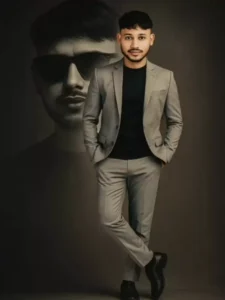
Modern style poster design featuring an south indian man (as per uploaded image) with neat messy coma hair with a split personality concept. On the front, a full-color version is shown: the man is wearing a modern light gray suit, standing casually with one leg crossed in front, hands in pockets, a confident and charismatic face. In the background, a black-and-white version of him is seen wearing sunglasses, staring intently ahead with a mysterious expression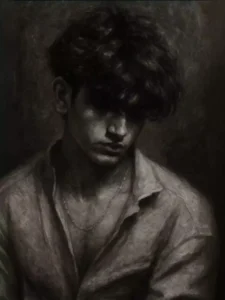
Transform this selfie into a moody black-and-white oil painting. The subject's head should be tilted downward, eyes unseen, with thick, wavy hair partially covering the forehead and eyebrows. Use expressive brushstrokes, deep shadows, and grainy textures to evoke a melancholic, introspective mood. Lighting must be dramatic and chiaroscuro-style, with a dim, textured background. Maintain a painterly feel with rich contrast and soft edges, as if done on canvas with oil paints.एआई ने हमारे लिए इसे आसान बना दिया है
आज के समय में AI की मदद से फोटो बनाना इतना आसान हो गया है कि कुछ साल पहले तक लोग इसकी कल्पना भी नहीं कर सकते थे। अब आप बिना किसी प्रोफेशनल स्किल के भी बेहद शानदार और हाई-क्वालिटी तस्वीरें बना सकते हैं।
पहले अगर किसी को ऐसी सिनेमैटिक या प्रोफेशनल फोटो तैयार करनी होती, तो उसे Adobe Photoshop जैसे जटिल सॉफ्टवेयर सीखने पड़ते थे। लेकिन सच यह है कि बहुत कम लोग Photoshop को अच्छी तरह इस्तेमाल करना जानते हैं। ज्यादातर मोबाइल यूज़र्स या शुरुआती एडिटर्स के लिए इस तरह की एडिटिंग करना काफी मुश्किल होता था।
लेकिन अब AI ने यह पूरा काम बेहद आसान बना दिया है। ChatGPT, Google Gemini और दूसरे AI टूल्स की मदद से आप सिर्फ एक अच्छे प्रॉम्प्ट के जरिए ऐसी फोटो बना सकते हैं, जो देखने में बिल्कुल प्रोफेशनल एडिट जैसी लगे।
सबसे मजेदार बात यह है कि आपको घंटों मैन्युअल एडिटिंग करने की जरूरत नहीं पड़ती। पहले जिस काम के लिए एडवांस स्किल और काफी समय चाहिए होता था, अब वही काम AI कुछ सेकंड में कर देता है।
अगर आप किसी खास स्टाइल—जैसे सिनेमैटिक, DSLR ब्लर, रेट्रो, फैंटेसी या वायरल इंस्टाग्राम लुक—की फोटो बनाना चाहते हैं, तो बस सही प्रॉम्प्ट लिखिए और AI बाकी काम खुद कर देगा। यही वजह है कि आज AI फोटो एडिटिंग तेजी से लोकप्रिय हो रही है और लोग इसे पारंपरिक एडिटिंग से ज्यादा पसंद कर रहे हैं।
How To Use New Trending 5 Chatgpt Cinematic Ai Photo Editing
अगर आप ChatGPT की मदद से ऐसी सिनेमैटिक AI फोटो बनाना चाहते हैं, तो इसकी प्रक्रिया उतनी मुश्किल नहीं है जितनी पहली नजर में लगती है। एक बार आप बेसिक तरीका समझ जाएंगे, तो भविष्य में किसी भी तरह की AI इमेज आसानी से बना पाएंगे।
हमने आपको अलग-अलग स्टाइल की इमेज और उनके साथ अलग-अलग प्रॉम्प्ट्स दिए हैं। हर व्यक्ति की अपनी पसंद होती है—किसी को डार्क सिनेमैटिक लुक पसंद आता है, तो किसी को रेट्रो या एस्थेटिक स्टाइल। इसलिए आप अपनी पसंद के अनुसार कोई भी प्रॉम्प्ट चुन सकते हैं।
आपकी सुविधा के लिए सभी प्रॉम्प्ट्स को साफ और हाइलाइट करके रखा गया है, ताकि उन्हें आसानी से कॉपी किया जा सके। अब नीचे दिए गए आसान स्टेप्स फॉलो करें:
AI फोटो बनाने का आसान तरीका
- सबसे पहले अपना पसंदीदा प्रॉम्प्ट कॉपी करें।
- नीचे दिए गए बटन या लिंक पर क्लिक करके AI वेबसाइट या टूल खोलें।
- वहां अपने Google अकाउंट से साइन अप या लॉगिन करें।
- अब अपनी एक साफ और अच्छी क्वालिटी वाली फोटो अपलोड करें।
- इसके बाद कॉपी किया हुआ प्रॉम्प्ट पेस्ट करें।
- अब “Generate” बटन पर क्लिक करें।
- कुछ ही सेकंड में आपकी AI इमेज तैयार हो जाएगी।
अगर आप बिल्कुल नए हैं, तब भी चिंता की कोई बात नहीं है। ज्यादातर AI टूल्स का इंटरफेस काफी आसान होता है, और इमेज अपलोड करने का विकल्प स्क्रीन पर साफ दिखाई देता है। बस फोटो अपलोड करें, प्रॉम्प्ट डालें और AI को अपना काम करने दें।
यही वजह है कि आज AI फोटो एडिटिंग इतनी तेजी से लोकप्रिय हो रही है—क्योंकि अब शानदार और प्रोफेशनल दिखने वाली तस्वीरें बनाना हर किसी के लिए आसान हो गया है।
Overall Tips
मैंने इस लेख में AI इमेज एडिटिंग से जुड़ी हर जरूरी चीज़ को आसान और विस्तार से समझाने की कोशिश की है—चाहे वह सही प्रॉम्प्ट चुनना हो, फोटो अपलोड करना हो या सिनेमैटिक AI इमेज बनाना। अगर आपने सभी स्टेप्स को ध्यान से फॉलो किया है, तो अब तक आपकी AI फोटो आसानी से तैयार हो गई होगी।
इसके अलावा, मैंने अपने पिछले लेखों में भी अलग-अलग AI एडिटिंग स्टाइल्स और प्रॉम्प्ट्स के बारे में विस्तार से बताया है, ताकि शुरुआती यूज़र्स भी बिना किसी परेशानी के सीख सकें।
अगर भविष्य में आपको कोई नया ट्रेंडिंग AI प्रॉम्प्ट, सिनेमैटिक एडिटिंग स्टाइल या वायरल फोटो इफेक्ट दिखाई देता है और आप उसके बारे में और जानना चाहते हैं, तो आप सीधे मुझसे संपर्क कर सकते हैं।
आप मुझे Instagram पर मैसेज कर सकते हैं या हमारे YouTube चैनल पर कमेंट करके अपने सवाल पूछ सकते हैं। हमारी वेबसाइट और सोशल मीडिया प्लेटफॉर्म्स पर आपको AI फोटो एडिटिंग से जुड़े नए ट्रेंड्स, प्रॉम्प्ट्स और अपडेट्स लगातार मिलते रहेंगे।
Share to Help