
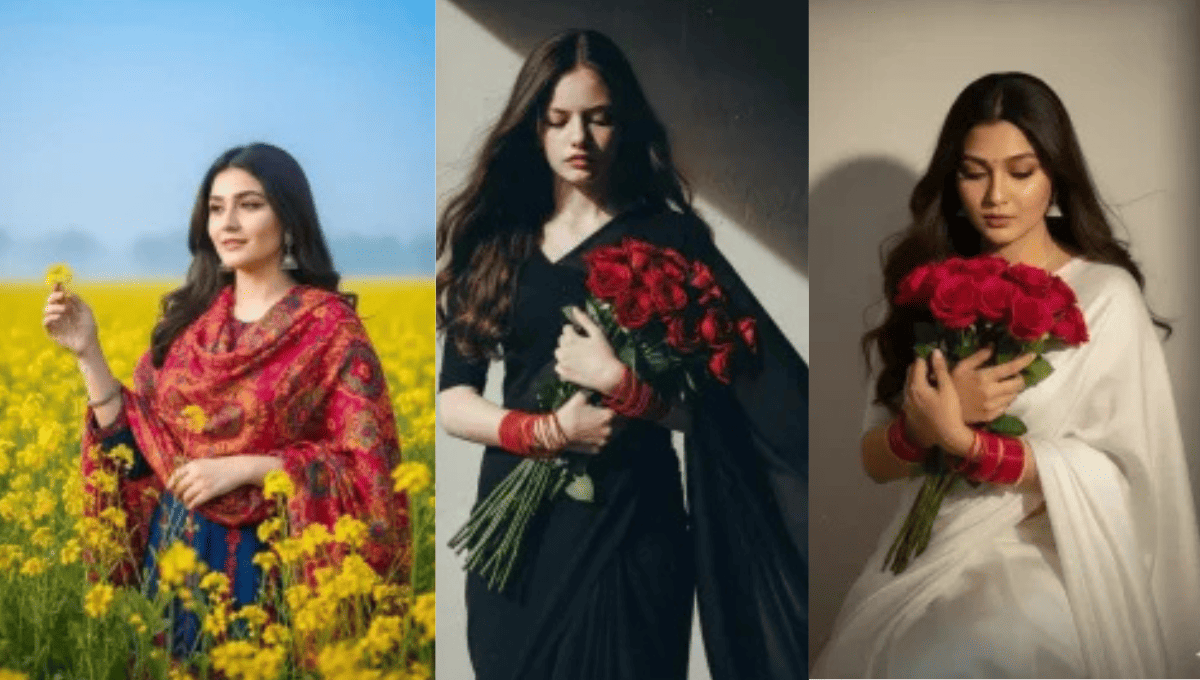
Chatgpt Girls Natural Ai Photo Editing Prompts 2026:आजकल सोशल मीडिया पर आपको ऐसी कई तस्वीरें देखने को मिलती हैं जो बेहद आकर्षक और अलग नजर आती हैं, खासकर लड़कियों की प्रोफाइल फोटो या रील्स की इमेज। कई बार इन्हें देखकर मन में सवाल आता है — क्या ये सच में असली तस्वीरें हैं या पूरी तरह से बनाई गई हैं?
सच यह है कि ये तस्वीरें असली ही होती हैं, लेकिन उन्हें कुछ स्मार्ट AI एडिटिंग तकनीकों की मदद से और ज्यादा खूबसूरत और प्रोफेशनल बनाया जाता है। सही लाइटिंग इफेक्ट, सॉफ्ट स्किन टोन, ड्रीम बैकग्राउंड और नेचुरल कलर ग्रेडिंग जैसी चीज़ें तस्वीर को एक अलग ही स्तर पर पहुंचा देती हैं।
अब तक मैंने लड़कों की फोटो एडिटिंग से जुड़े कई तरीके साझा किए थे, लेकिन काफी समय से लड़कियों की नेचुरल AI एडिटिंग पर विस्तार से बात नहीं की गई थी। इसलिए इस लेख में मैं आसान और समझने योग्य स्टेप्स में बताने जा रहा हूँ कि आप कैसे अलग-अलग स्टाइल की लड़कियों की तस्वीरें तैयार कर सकते हैं — चाहे वह एस्थेटिक लुक हो, सिनेमैटिक स्टाइल हो या बिल्कुल नेचुरल ग्लो वाला पोर्ट्रेट।
यह गाइड खासतौर पर उन लोगों के लिए है जो AI फोटो एडिटिंग सीखना चाहते हैं लेकिन शुरुआत कैसे करें, यह नहीं जानते। यहां आपको स्टेप-बाय-स्टेप जानकारी मिलेगी — कैसे सही फोटो चुनें, कौन से प्रॉम्प्ट लिखें, एडिटिंग को अपनी पसंद के अनुसार कस्टमाइज़ कैसे करें और अंत में शानदार रिज़ल्ट कैसे पाएं।
अगर आप भी सोशल मीडिया के लिए प्रोफेशनल और फिर भी नेचुरल दिखने वाली तस्वीरें बनाना चाहते हैं, तो यह लेख आपके लिए एक पूरी मार्गदर्शिका साबित होगा।
Complete Breakdown Of This Editing
अब ज़रा विस्तार से समझते हैं कि पूरी प्रक्रिया कैसे काम करती है और आपको इसमें क्या-क्या सीखने को मिलेगा। अक्सर आपने देखा होगा कि लड़कियाँ सोशल मीडिया पर अलग-अलग स्टाइल की तस्वीरें शेयर करती हैं — कभी ट्रेडिशनल लुक में, कभी मॉडर्न आउटफिट में, तो कभी पूरी तरह से प्रोफेशनल पोर्ट्रेट स्टाइल में। पहली नज़र में ये तस्वीरें किसी स्टूडियो में खींची हुई लगती हैं, लेकिन असल में इनमें AI एडिटिंग की बड़ी भूमिका होती है।
जब आप अपनी एक साधारण सेल्फी का इस्तेमाल करते हैं और सही निर्देश (प्रॉम्प्ट) देते हैं, तो वही सामान्य फोटो बेहद नेचुरल और रियलिस्टिक लुक में बदल सकती है। कई बार रिज़ल्ट इतना असली लगता है कि खुद को देखकर भी यकीन करना मुश्किल हो जाता है।
आप अपनी रोज़मर्रा की फोटो को भारतीय पारंपरिक स्टाइल में बदल सकते हैं — जैसे सलवार सूट, साड़ी या एथनिक ज्वेलरी के साथ। वहीं अगर आप चाहें तो उसी फोटो को मॉडर्न ड्रेस, स्टाइलिश पोज़ और ट्रेंडी लुक में भी तैयार कर सकते हैं। इतना ही नहीं, बैकग्राउंड भी पूरी तरह बदला जा सकता है। एक साधारण कमरे की दीवार की जगह प्रोफेशनल स्टूडियो, गार्डन, कैफे या ड्रीमी आउटडोर सीन जोड़ा जा सकता है।
इस पूरी प्रक्रिया के लिए हम जेमिनी AI जैसे स्मार्ट टूल का इस्तेमाल करेंगे। हम आपको यह भी सिखाएंगे कि सही फोटो कैसे चुनें, प्रॉम्प्ट कैसे लिखें और छोटे-छोटे बदलाव करके रिज़ल्ट को और बेहतर कैसे बनाएं। यानी आप केवल तैयार फोटो ही नहीं पाएंगे, बल्कि खुद से शानदार तस्वीरें बनाना भी सीख जाएंगे।
Some Mistakes You Should Always Avoid
AI फोटो एडिटिंग करते समय छोटी-छोटी गलतियाँ भी आपके रिज़ल्ट को खराब कर सकती हैं। इसलिए एडिटिंग और पोस्टिंग – दोनों चरणों में कुछ बातों का ध्यान रखना बहुत जरूरी है।
सबसे पहले बात करें फोटो चयन की। एडिटिंग के लिए हमेशा एक साफ और स्पष्ट सेल्फी चुनें। आपका चेहरा पूरी तरह दिखाई देना चाहिए और उस पर ज्यादा एक्सप्रेशन नहीं होना चाहिए। बहुत ज्यादा मुस्कुराते हुए, मास्क लगाए हुए या बालों से चेहरा ढका हुआ फोटो इस्तेमाल न करें। टोपी या बड़े चश्मे से भी बचें। कोशिश करें कि फोटो बिल्कुल सामान्य, सीधी और सादी हो — जितनी नेचुरल तस्वीर होगी, AI उतना ही बेहतर और रियलिस्टिक रिज़ल्ट देगा।
फोटो क्लिक करते समय कैमरा सामने की ओर रखें और अच्छी रोशनी में तस्वीर लें। धुंधली या कम रोशनी वाली फोटो से एडिटिंग का आउटपुट कमजोर हो सकता है। एक साफ फ्रंट-फेस सेल्फी ही काफी होती है; पूरे शरीर की फोटो की जरूरत नहीं है जब तक आप खास स्टाइल न बना रहे हों।
दूसरी बड़ी गलती सेव करने के तरीके में होती है। कई लोग एडिट की गई फोटो को सीधे स्क्रीन से टैप करके सेव कर लेते हैं, जिससे उसकी क्वालिटी कम हो जाती है। सही तरीका यह है कि फोटो को पूरा खोलें और फिर दिए गए आधिकारिक “Save” या “Download” विकल्प से सेव करें। इससे इमेज की गुणवत्ता बनी रहती है।
अब बात आती है पोस्ट करने की। जब आप फोटो या वीडियो सोशल मीडिया पर अपलोड करते हैं, तो सही हैशटैग का उपयोग जरूर करें। बिना हैशटैग के आपकी पोस्ट सीमित लोगों तक ही पहुंचेगी। संबंधित और ट्रेंडिंग हैशटैग आपकी फोटो की पहुंच बढ़ाने में मदद करते हैं और एंगेजमेंट भी बेहतर होता है।
अगर आप इन साधारण लेकिन महत्वपूर्ण बातों का ध्यान रखते हैं, तो आपकी AI एडिटिंग न सिर्फ प्रोफेशनल लगेगी बल्कि सोशल मीडिया पर बेहतर प्रदर्शन भी करेगी।
Chatgpt Girls Natural Ai Photo Editing Prompts 2026
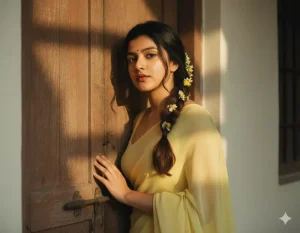
"prompt": "A perfect plain chiffon saree pastel coral pink, dreamy Pinterest retro aesthetic. Hair open wavy with scarf tied loosely. Girl sitting by window, soft golden sunlight falling on face, lost in thought. Cinematic pastel grading with glowing highlights.",
 "ratio": "9:16",
 "style": "Ultra HD, Pastel Glow, Dreamy Retro"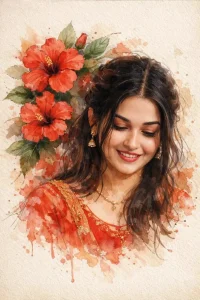
A stylized digital watercolor illustration of a young woman with soft, realistic facial features and expressive eyes, black hair loosely tied back with strands falling around her face. She wears a red traditional dress with subtle gold detailing and delicate jewelry. Large red hibiscus flowers and green leaves surround her head and shoulders, blending into the background like ink and watercolor splashes. The composition is slightly tilted, giving a dreamy, poetic feel. Fine sketch lines, paint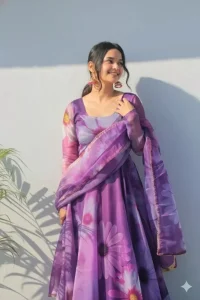
A vibrant, eye-level outdoor shot features a beautiful young Indian woman with dark hair tied back, posing confidently against a sunlit, textured white wall. She's dressed in a stunning purple floral Anarkali suit with a long, flowing skirt and matching dupatta, both adorned with large, expressive flower patterns in various shades of purple, pink, and white. Her attire is complemented by ornate, dangling earrings. The sunlight creates interesting shadows on the wall to the left, and a hint of green foliage is visible at the bottom left. The woman's expression is joyful and serene, with a slight smile and her gaze directed towards the upper right.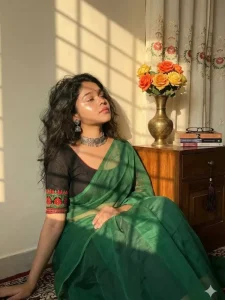
using my face Subject: Young Indian/South Asian woman, "soft girl" aesthetic.
Skin: Warm undertone, "glass skin" makeup, high-gloss highlighter on cheekbones and nose, soft pink lips. Hair: Dark brown/black, loose waves, voluminous, messy but styled. Attire: Green saree (looks like organza or chiffon tissue fabric), black blouse with red/green embroidery on the hem, silver oxidized choker, silver jhumka earrings. 2. Pose & Expression:bPose: Sitting on the floor, relaxed, leaning back, hand resting gently on the knee/saree. Head position: Chin tilted up, face turned slightly away from the camera toward the light source. Expression: Serene, peaceful, "main character energy," eyes half-closed or looking down/away. 3. Environment & Props: Background: White/Cream wall, curtains with vertical floral vine embroidery. Furniture: Wooden cabinet/side table with a warm varnish finish. Props: Antique brass/metal narrow-neck vase, bouquet of orange and yellow roses (fake/fabric flowers), stack of books (blue, white, grey spines), reading glasses, dark hanging tassel ornament on the drawer knob. 4. Lighting & Atmosphere (Crucial): Type: Direct sunlight, Golden Hour, Sunset light. Effect: Chiaroscuro (strong contrast between light and dark). Shadows: The light is casting a "gobo" effect (shadow of a window grid or blinds) onto the wall and the subject.Vibe: Warm, nostalgic, cozy, aesthetic, vintage. 5. Camera Settings & Tech: Angle: Eye-level or slightly low angle. Focal Length: 35mm or 50mm (portrait but including environment). Aperture: f/2.8 or f/4 (Subject is sharp, background is slightly softened but readable).Style: Kodak Portra 400 film emulation (for that warm, grainy look).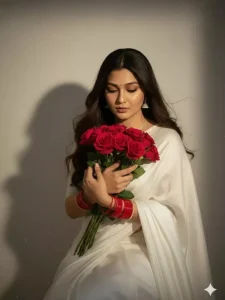
Create a retro vintage grainy but bright image of the reference picture but draped in a perfect white colour.
Pinteresty aesthetic retro saree and red bangles. It must feel like a 90s movie straight wavy hair with a bouquet of red roses and romanticising windy environment. The girl is looking down sitting against a solid wall deep shadows and contrast drama, creating a mysterious and artistic. Keep the face and body size same as I uploaded no alternation.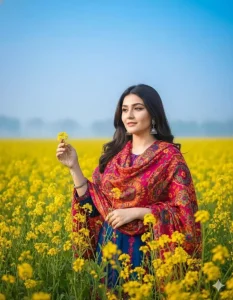
A vibrant portrait of a young Bangladeshi
woman standing in the middle of a blooming yellow mustard flower field. She is gently touching the flowers with one hand. The sky is clear blue with a hint of soft white mist near the horizon.She is wearing a colorful winter outfit that contrasts beautifully with the yellow flowers.The image is bright, colorful, and highly saturated. Professional photography,shallow depth of field. The face must strictly match the attached reference image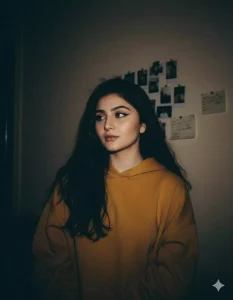
A low-light 90s disposable-camera photo of a young woman with the same unchanged face and pale complexion. Dim ambient lighting barely outlines her features. Loose black hair blends into the shadows.

She wears a dark yellow hoodie. The background is a barely visible beige wall with taped polaroids and scribbled notes, softly swallowed by darkness. Heavy grain, muted contrast, moody realism. The face expression should 100% same With 4k resolution ..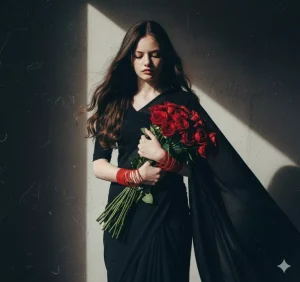
Create a retro vintage grainy but bright image of the reference picture but draped in a perfect black colour. Pinterest aesthetic retro saree and red bangles. The girl is looking down standing against a solid wall deep shadows and contrast drama, creating a mysterious and artistic same face.How To Create Image With Girls Natural Ai Photo Editing Prompts
अब जब आप सभी ज़रूरी बातें समझ चुके हैं, तो दिए गए निर्देशों की मदद से आसानी से एक शानदार फोटो तैयार कर सकते हैं। सबसे अच्छी बात यह है कि आप अलग-अलग स्टाइल ट्राय करके देख सकते हैं कि कौन-सी शैली आप पर सबसे ज्यादा सूट करती है। कुछ लोगों को मॉडर्न आउटफिट और ट्रेंडी लुक पसंद आता है, तो कुछ पारंपरिक पहनावे में खुद को ज्यादा सहज महसूस करते हैं।
हमने अलग-अलग प्रकार की फोटो स्टाइल के साथ उनके नीचे संबंधित प्रॉम्प्ट भी दिए हैं। आपको जो स्टाइल सबसे आकर्षक लगे, उसका प्रॉम्प्ट कॉपी कर लें। इसके बाद नीचे दिए गए “छवि बनाएं” (Create Image) विकल्प पर क्लिक करें। यह आपको सीधे Google Gemini की वेबसाइट पर ले जाएगा।
पहली बार इस्तेमाल करते समय आपको अपनी ईमेल आईडी से साइन अप करना होगा। यदि आप Chrome ब्राउज़र का उपयोग कर रहे हैं, तो अक्सर यह अपने-आप लॉग इन भी हो जाता है।
लॉग इन करने के बाद फिर से “Create Image” विकल्प चुनें। बेहतर रिज़ल्ट के लिए मॉडल सेक्शन में “Pro Model” का चयन करें। इससे आपका लिखा हुआ प्रॉम्प्ट अधिक सटीक तरीके से समझा जाएगा और उसी अनुसार फोटो तैयार होगी।
अब नीचे दिए गए प्लस (+) आइकन पर क्लिक करें और अपनी वही साफ-सुथरी सेल्फी अपलोड करें, जिसका जिक्र पहले किया गया था। सब कुछ सेट हो जाने के बाद “Generate” पर क्लिक करें और कुछ सेकंड इंतजार करें।
बस, कुछ ही पलों में आपकी साधारण फोटो एक आकर्षक, प्रोफेशनल और सोशल मीडिया-रेडी इमेज में बदल जाएगी।
Alternative Prompts
कई बार ऐसा होता है कि एडिटिंग के दौरान आपको लगता है कि जो विकल्प आपके सामने हैं, वे आपकी कल्पना के अनुसार नहीं हैं। यह बिल्कुल सामान्य बात है। हर व्यक्ति की पसंद अलग होती है — किसी को सॉफ्ट और नेचुरल लुक पसंद आता है, तो किसी को बोल्ड या सिनेमैटिक स्टाइल।
अगर दिए गए एडिटिंग विकल्पों में से कोई भी आपको पूरी तरह पसंद नहीं आता, तो घबराने की जरूरत नहीं है। आपके पास हमेशा दूसरे विकल्प मौजूद हैं। सबसे पहले आप हमारी वेबसाइट पर जाकर “Girls Prompt” सर्च कर सकते हैं। वहां आपको लड़कियों से संबंधित अलग-अलग स्टाइल के कई प्रॉम्प्ट मिल जाएंगे। हमने कभी भी सिर्फ एक ही प्रॉम्प्ट तक चीजों को सीमित नहीं रखा है; हर स्टाइल के लिए कई वैरिएशन दिए गए हैं ताकि आप अपनी पसंद के अनुसार चुन सकें।
फिर भी अगर आपको लगे कि आपकी ज़रूरत के मुताबिक प्रॉम्प्ट वहां उपलब्ध नहीं है, तो एक और आसान रास्ता है। आप सीधे ChatGPT पर जा सकते हैं। वहां अपनी फोटो अपलोड करें और उससे उस इमेज के लिए एक डिटेल्ड प्रॉम्प्ट तैयार करने का अनुरोध करें। कुछ ही पलों में आपको आपकी फोटो के हिसाब से कस्टम प्रॉम्प्ट मिल जाएगा।
उस प्रॉम्प्ट को लेकर आप अपने पसंदीदा AI टूल में इस्तेमाल कर सकते हैं और मनचाही स्टाइल की फोटो तैयार कर सकते हैं। यानी अगर एक रास्ता काम न करे, तो दूसरा रास्ता हमेशा खुला है। बस सही दिशा में कदम बढ़ाने की जरूरत है।
Share to Help